
Your data kept apart. Every change on record.
How xProduct protects product passport data: each company's data kept separate, three levels of access on every passport, two-factor sign-in for owners and admins, and a tamper-evident ledger that anyone with the report can check against a public blockchain. Written for manufacturers, brand owners, importers, buyers and auditors.
Book a demo What the app does as of November 2026. No security certification is claimed.
Product ledger · example
Wooden Rainbow Stacker
-
Section saved: Materials
by user 1042 · 9 Nov, 14:02
hash 4c1e…a97d previous b20f…3e18
-
Certificate added: EN 71-3 test report
by user 1042 · 9 Nov, 14:09
hash e83a…0c52 previous 4c1e…a97d
-
Passport published
by user 1007 · 9 Nov, 14:21
hash 9be0…71f4 previous e83a…0c52
An example drawn for this page; the hashes are shortened.
- of access on every passport: public, professional, authority
- 3 levels
- required for account owners and admins
- 2FA
- every ledger checked, and a fingerprint on a public blockchain when something changed
- Every night
- UK data in the UK, EU data in the EU
- UK · EU
01/The promise
Four things we do with your passport data
A product passport is read by customers, partners and authorities for years. It has to stay with the right company, show each reader only what they may see, and keep a record that makes a later change visible when it is checked.
-
Kept apart
Each company's data is separate. Everything you see and change after signing in is limited to your own account, so one customer cannot see another's private records.
-
Shown by level
Customers, partners and authorities each see their own level of the passport. Private documents stay at the authority level.
-
Recorded
Every change goes into the product's ledger, each entry linked to the one before. Who changed what, and from what to what.
-
Checkable
Ledgers are checked every night. When something changed, a fingerprint goes to a public blockchain, and standard passport answers carry a signature anyone can check.
What we do not claim
xProduct holds no security certification such as ISO 27001 or SOC 2, and no system is beyond attack. Tamper-evident means a later change can be seen and checked; it does not make the data correct. What a passport says remains the company's own statement.
02/Who can see what
Three levels of access on every passport
One rule decides what each reader sees for each product. The public passport, the passport API and the file links all use the same rule, and it never crosses from one company's account to another.
-
Public
Who
Anyone who scans the QR code, including people signed in to another company's account.
Sees
The published passport and the documents you chose to make public.
-
Professional
Who
Your own return, repair and recycling partners, your approved sellers, and partner links you have issued.
Sees
The public passport plus the lifecycle events marked for professionals. Not your private documents.
-
Authority
Who
Your own staff, regulators, customs and auditors you invite (Manufacturer plan), and inspectors you approve with a time-limited link.
Sees
Everything in the passport, including private documents, certificates and restricted battery data.
Team roles
The account owner gives each team member a fixed role. Pages check the role before they open; company settings and roles stay with the owner.
All roles: Manufacturer plan
Can change data
- Owner
- Admin
- Lifecycle manager
View only
- Auditor, Regulator, Customs
- Approved seller
- Repair operator, Recycler
Roles are a fixed list: you cannot make your own role levels or limit a role to some products. An approved seller sees the account's products at the professional level, read only.
- Restricted files by short-lived link A private document opens only through a signed link made for a reader who may see it. The link is tied to one file and one product, runs out quickly, and never shows where the file is stored.
- Authorities ask, you decide A market surveillance or customs officer can ask for access from the public passport. You approve or decline; an approval gives a time-limited link to the authority view, with no account needed.
- Partner links you can switch off Partners get a random access link with an end date, or their own sign-in. We keep only a fingerprint of each link. Revoke it and even an open browser tab stops working.Manufacturer plan
- API keys shown once Keys for the write API are shown once and stored only as a fingerprint. Each has a scope and an optional end date, can be revoked, and is logged.Manufacturer plan
03/Sign-in protection
Two-factor sign-in for the people who hold the keys
Two-factor sign-in is required for account owners and admins, and optional for everyone else. It works with any authenticator app.
-
Authenticator app codes
Six-digit codes from any authenticator app. Required for owners and admins, available to everyone. The secret behind it is stored encrypted.
-
Recovery codes
Ten one-time recovery codes in case a phone is lost, stored only as fingerprints.
-
Passwords never in plain text
Passwords are stored as one-way hashes. A wrong password gets one general message that does not say whether the e-mail address is registered.
-
Repeated attempts blocked
Repeated wrong passwords, codes and reset requests are slowed down and blocked for a while. We can also lock an account if needed.
-
Idle sign-out
After a period without activity you are signed out automatically, with a warning first. Activity in any tab counts.
-
Reset links that expire
Password reset links expire and work once. Reset, invitation and e-mail confirmation links are stored only as fingerprints, so a copy of our database could not produce working links.
-
Encrypted session
Your signed-in session is encrypted by our server and held for that browser tab; it is not a readable token.
-
Every sign-in logged
Each sign-in attempt, successful or not, is recorded with the reason and the address it came from. The account owner can see the list.
Manufacturer plan
In the Shopify app you sign in through Shopify, so your Shopify login and its two-factor setting protect it; every request is checked with Shopify's signed tokens.
04/Tamper-evident records
Every change recorded. Any change can be checked.
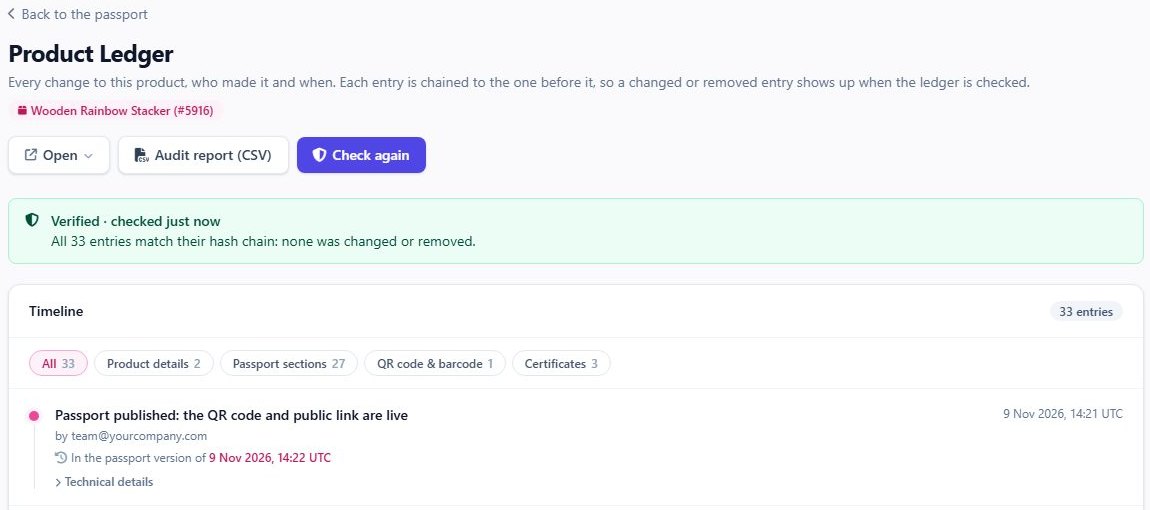
Products stay editable. Every change to a product, its sections, its documents and its publishing goes into the product's ledger, each entry linked to the one before, so a changed, removed or reordered entry shows up when the ledger is checked.
-
01
A change is saved
A section, a document, a QR code, a publish or a transfer: each change becomes a ledger entry with who made it and the old and new values.
-
02
Linked to the one before
Each entry holds a SHA-256 fingerprint of its own content and of the entry before it, so the entries form a chain for each product.
-
03
Checked every night
Every chain is worked out again from the first entry. If a check fails, the account is told by e-mail, once rather than every night. You can check again at any time.
-
04
A public record
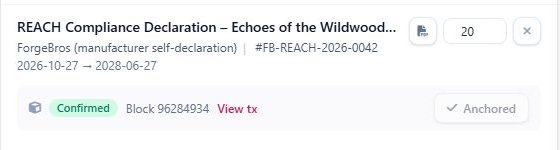
When something changed, one fingerprint per account goes to the Polygon public blockchain. A later change to an old entry would no longer match it.
 Open the full-size picture
The nightly record holds one fingerprint per account, not one per product. The Ledger health report lists the lines behind it, so anyone with the report can work out the same fingerprint and compare it with the blockchain.
-
The passport on any date
Versions are kept for public, professional and authority readers, a minute after each save and every night. Stored versions cannot be edited.
-
Lifecycle events, add-only
Returns, repairs and recycling are chained per product. The database refuses edits and deletes; a correction is a new event.
-
Access log, add-only
Reads of restricted data and changes to who has access are logged, chained, and protected from edits and deletes.
-
Partner events reviewed
Events from partners wait for your review: approve, reject or ask for a correction. Each one goes into the ledger.
How the blockchain record works, step by step, with a real transaction.
Blockchain verification05/Passport seal
A signature anyone can check, even offline
Every standard-format passport answer from xProduct carries a digital signature (JSON Web Signature, ES256). The signing key is kept in a key vault; the public keys are published, older ones included, so a copy saved today can still be checked years from now.
- Passport
- Standard passport answer (JSON)
- Signature
- JSON Web Signature · ES256
- Sealed by
- xProduct, for the company named in the passport
- Public keys
- /.well-known/jwks.json
- Data changed?
- No
Signature valid: the data has not changed since it was sealed
- The seal travels with the data. A buyer, auditor or registry that saves the passport can check later that not one value has changed.
- No call to us needed. The check uses the published public keys, so it also works offline.
- A checker in your browser. Paste a passport answer into the public seal checker; the check runs in your own browser.
- Every field defined. Each standard answer links to the data dictionary: every data element with its id, definition, unit and access level.
Today this is xProduct's platform seal, made for the company named in the passport. It is not yet that company's own qualified electronic seal.
06/Where data is kept
UK data in the UK, EU data in the EU
The UK service and the EU service run separately, each with its own database and file storage. UK accounts live on xproduct.co.uk with their products, passports and files in the UK; EU accounts on xproduct.eu with their products, passports and files in the EU.

xproduct.co.uk
UK accounts
Your products, passports, documents and pictures are stored in the UK.

xproduct.eu
EU accounts
Your products, passports, documents and pictures are stored in the EU, in a separate database and file store.
-
Secrets in a key vault
Secrets for connected services and the passport signing keys are kept in Azure Key Vault, not in the code.
-
HTTPS and strict browser rules
Every page is sent over HTTPS with security headers that limit where scripts, forms and frames can come from.
-
Limits on requests
The API, sign-in and public pages are rate-limited, and public forms such as warranty registration have bot protection.
-
Shopify app checked
The Shopify app checks every request with Shopify's signed tokens, and Shopify's messages to us are checked too.
Privacy by default
- Public passport pages load no analytics or marketing scripts and show no cookie banner.
- On our own website, analytics load only after you agree to them.
- Scan statistics keep a shortened IP address, and scan logs are deleted after a set period.
- Warranty registrations: personal details are removed 12 months after the cover ends.
- The ledger stores the user number of whoever made a change, not their e-mail address; your team sees who it was when it opens the ledger.
- Users can delete their own login and personal details from their profile; Shopify privacy requests are handled.
07/Always online
Printed QR codes have to keep working
A QR code on a product can be scanned for ten years or more. So the data is backed up, a copy of every public passport is kept outside our main hosting, and you can take all your data with you.
- Database
Automatic backups
Automatic, geo-redundant database backups with point-in-time restore, and deleted files kept for a while before they are gone for good.
- Every night
A second copy of public passports
Each night a signed copy of every published passport is kept with a second provider, outside our main hosting, so QR codes can keep working if our main service stops. It is a standby copy, switched on by us when needed.
- Your data
Take it with you
From the xProduct web app, export a full archive of your passports (products, certificates, passport data and ledger) at any time, so you are never locked in.
08/For auditors and authorities
Look at everything, change nothing
Auditors, regulators and customs officers invited to an account get read-only pages. Inspectors without an account can ask for access from the public passport.
Manufacturer plan
Read-only pages
Dashboard, products, lifecycle, ledger, audit trail, certificates, transfers and governance. Auditor pages only read data: there is nothing to save, edit or delete.
One audit trail
Every recorded action, one per row: ledger entries with their number and fingerprint, production steps, and changes to who may see restricted data. Export it as CSV.
Ledger health report
Each product's check result and latest fingerprint, and the lines behind the last blockchain record, in a PDF anyone can use to work out the same fingerprint.
Who saw restricted data
The access log shows reads of restricted passport data and every change to links, partners, team members and inspectors; a check finds the first entry that does not fit.
Inspectors without an account
Request access from any public passport. The company approves or declines; requests left unanswered are passed on to us.
09/Standards
Designed to support the European passport standards
Where the new European DPP standards ask for access levels, history, signatures and logs, this is what xProduct has today. It is our own reading, not a certificate.
| Standard | Topic | In xProduct | How far |
|---|---|---|---|
| EN 18218 | Access by type of reader | Public, professional and authority levels, one rule for the passport page, the API and file links. | In place |
| EN 18221 · EN 18222 | Passport history by date | Every version kept for the passport's lifetime and for each access level, readable by date through the API under the same access rules as the current passport, and sealed like any standard answer. | In place |
| EN 18223 | Data dictionary | Every data element with a fixed id, definition, type, unit and access level; each standard answer links to it. | In place |
| EN 18239 | Logging access to restricted data | An add-only access log with chained fingerprints, for reads of restricted data and changes to access rights. | In place |
| EN 18246 | Signed passport data | ES256 signature on every standard answer, public keys published. Today a platform seal, not the operator's own qualified seal. | First step |
xProduct holds no certification against these standards, and using xProduct does not on its own make a passport meet a law. Check the rules for your product in the product rules library. Product rules library
10/Live examples
Open a real passport
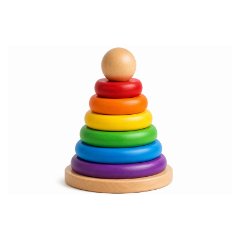
Two live passports, as customers see them after scanning the code: a wooden toy and an e-bike battery. Then check a passport's seal yourself.
11/FAQ
Short answers
A security questionnaire to fill in, or another question? Send it to us, or see the app in a short demo.
Can another company see our data?
No. Everything you see and change after signing in is limited to your own account, and access levels never cross from one account to another. Other xProduct customers see only what anyone sees: your published public passports.
Can a regulator see our private documents?
Only if you let them: invite them as a Regulator, Customs or Auditor user (Manufacturer plan), or approve their request from the public passport (all plans). Both give the authority level for your passports, and every read of restricted data is logged.
Is the data on the blockchain?
No. Only fingerprints go on the Polygon blockchain: one per account each night when something changed, and one per certificate you anchor. A fingerprint cannot be turned back into your data.
Does tamper-evident mean nobody can change the data?
No. Products stay editable, and every change is recorded. Tamper-evident means a change made outside the app, or a removed entry, shows up when the ledger is checked. It also does not prove the data is correct: that remains the company's own statement.
Is two-factor sign-in required?
For account owners and admins, yes. Everyone else can switch it on in their profile. In the Shopify app you sign in through Shopify, so your Shopify login and its two-factor setting apply.
What happens to our passports if xProduct stops?
A signed copy of every public passport is kept each night with a second provider. It is a standby copy that we can switch on so printed QR codes keep working, and from the xProduct web app you can export a full archive of your passports at any time.
What happens to older versions when we withdraw a passport?
They are kept: every version is stored for the passport's lifetime and follows the same access rules as the current passport. When a passport is withdrawn, the public sees it as no longer available, while authorities with an approved access link, partners with access and the manufacturer's own team can still read its versions by date. Products already sold should keep their passport available for the period the product rules set.
Are you ISO 27001 or SOC 2 certified?
No, we hold no such certification. This page lists what the app does, and we are happy to answer your security questionnaire.
Is the passport seal a qualified electronic seal?
Not yet. It is xProduct's platform seal made for the company named in the passport. It proves the data has not changed since it was sealed, and anyone can check it with our published keys.
Can we give a seller access to only some products?
Not at the moment. Roles are a fixed list for the whole account; an approved seller sees the account's products at the professional level, read only.
Secure, tamper-evident digital product passports
A digital product passport is only useful if people can trust it. xProduct keeps each company's passport data separate, shows each reader the right level of detail, protects sign-in with two-factor authentication, records every change in a linked ledger checked every night and anchored on the Polygon blockchain, and signs standard passport answers so anyone can check them.
Share what you must. Protect the rest. Keep the proof.
Start free with one product, or book a demo and we will show you roles, access levels and the ledger with your own products in mind.